Say you had a table that had different columns for images, and wanted to use a variable column name to update that image. You could create a function like below
CREATE OR REPLACE FUNCTION public.update_inventory_image_by_column(

    inventory_line_id int8,

    image_column_name varchar,

    new_image_url varchar

) RETURNS int

LANGUAGE plpgsql

AS $function$

DECLARE

    query_text VARCHAR;

    rows_affected int;

BEGIN

    -- Validate the provided column name

    IF image_column_name NOT IN ('front_image_url', ' back_image_url ', 'image_3') THEN

        RAISE EXCEPTION 'Invalid column name';

    END IF;

    -- Construct the dynamic query

    query_text := FORMAT('UPDATE public.inventory_line SET %I = $2 WHERE id = $1', image_column_name);

    -- Execute the dynamic query

    EXECUTE query_text USING inventory_line_id, new_image_url;

    -- Check how many rows were affected

    GET DIAGNOSTICS rows_affected = ROW_COUNT;

    -- Check if any row was updated

    IF rows_affected = 0 THEN

        RAISE EXCEPTION 'Inventory line with id % not found.', inventory_line_id;

    END IF;

   -- Return the number of rows affected

    RETURN rows_affected;

END;

$function$;

You can then create an invisible button over your image with a trigger to set the variable and then go to a step to capture the image. (Different variable for each invisible button of course)
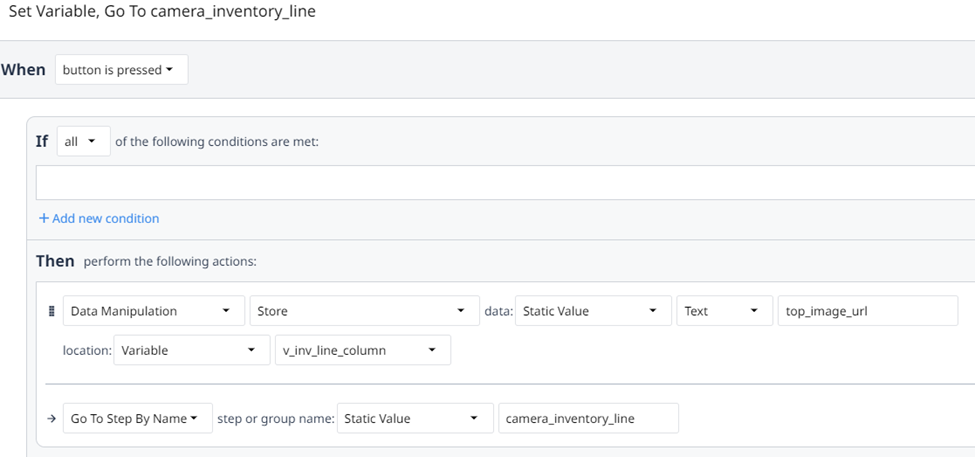
Then on the camera widget you can have a dynamic Input message based on the variable being passed in

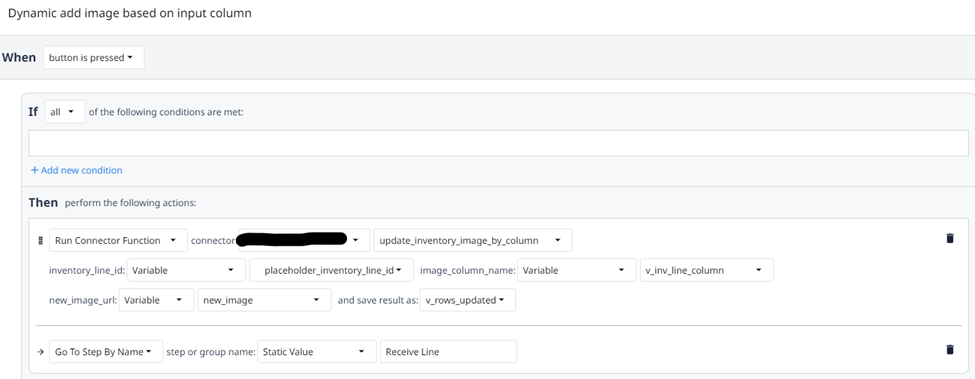
And then you can call from the camera step the function (make the function first of course) passing the column variable.

 Michael Ellerbeck