I’ve always wanted to experiment with face recognition and AWS makes it fairly simple!
Its interesting to note that they don’t actually store your face, just a vectorized mathematical representation.
To avoid PII issues, don’t use any personal identifiers, use ID’s instead.
Also, from the docs. Your chosen similarityThreshold should reflect the nature of your specific use case. Any use case involving critical security applications should use 99 as the selected threshold.
At a high level, you create a collection. Of course, this being AWS you must create the collection using the command line. https://docs.aws.amazon.com/rekognition/latest/dg/identity-verification-tutorial.html
client.create_collection(CollectionId=faces)

Once the collection is created you need to create a user

client.create_user(

            CollectionId=faces,
            UserId=1234
        )
https://docs.aws.amazon.com/rekognition/latest/dg/create-user.html
Once a user has been created then you can add faces to a collection and then associate them with a user. I like to do it as one lambda
https://docs.aws.amazon.com/rekognition/latest/dg/add-faces-to-collection-procedure.html
This returns a face_id, for example 578e2e1b-d0b0-493c-aa39-ba476a421a34
Then you associate the face with the user id
https://docs.aws.amazon.com/rekognition/latest/dg/associate-faces.html
try:
        response = client.associate_faces(
            CollectionId=faces,
            UserId=1234,
            FaceIds=578e2e1b-d0b0-493c-aa39-ba476a421a34

        )
Multiple faces are recommended to help identify a user from different angles etc…
Once a face has been registered when can then search for it.
Using a different image you can then search
rekognition_client.search_users_by_image(
CollectionId=collection_id,
Image={‘Bytes’: image_bytes},
MaxUsers=max_users,
UserMatchThreshold=user_match_threshold
Now, let’s use this from within Tulip.
Of course my favorite method is to use a postgres function to call the lambda
CREATE OR REPLACE FUNCTION globalstructure.create_rekognition_user(collection_id varchar, user_id varchar)

 RETURNS integer

 LANGUAGE plpgsql

AS $function$

DECLARE

    create_json TEXT;

    response TEXT;

    status_code TEXT;

BEGIN

    RAISE INFO 'Starting Lambda invocation';

    -- Construct the JSON payload

    create_json := json_build_object(

        'collection_id', collection_id,

        'user_id', user_id

    )::text;

    -- Invoke the Lambda function

    SELECT INTO response payload

    FROM aws_lambda.invoke(

        aws_commons.create_lambda_function_arn('create_rekognition_user', 'us-east-1'),

        create_json::json,

        'RequestResponse'

    );

    -- Log the response

    RAISE INFO 'Response: %', response;

    -- Extract status code from the response

    SELECT INTO status_code response::json->>'statusCode';

    -- Check if the Lambda was successful

    IF status_code = '200' THEN

        RETURN 1;

    ELSE

        RETURN 0;

    END IF;

END;

$function$;
Do the same for the add_face_to_rekognition and search_rekognition_face.
Now of course wire these functions up in Tulip.


Create a Tulip App

Try it out
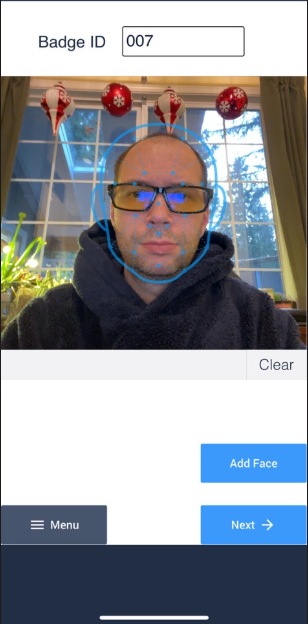
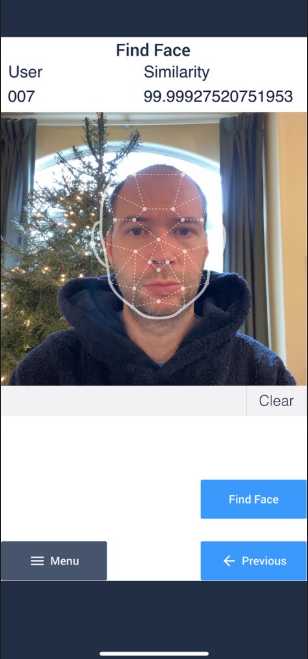
Found me, Bond James Bond
 Michael Ellerbeck