Ok, maybe not that very strange or mysterious but…
- How to display an animated gif in workshop
- How to route between two GPS points and display the route on a map
- Make things move on the map (well 10 seconds intervals)
If you ever have the need of displaying an animated gif in workshop you can do so by:
Uploading it to project / Files as a raw file
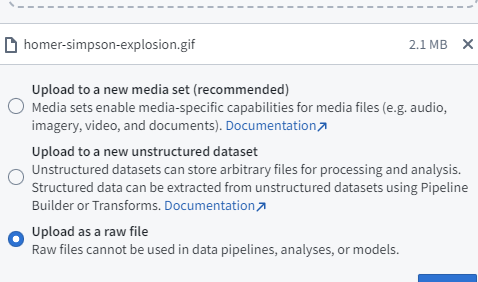
And then you can reference it as a Static blobster RID

Livin the blobster RID life
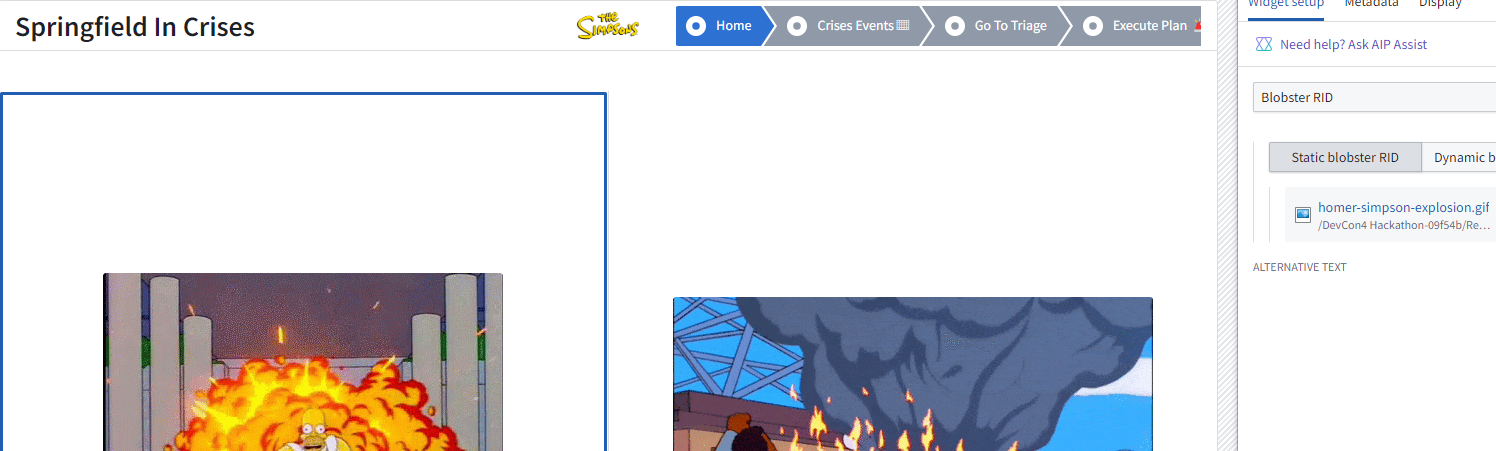
—
The next interesting tidbit was I wanted to street route from one gps coordinate to another. Ran across https://openrouteservice.org/
Set up the API
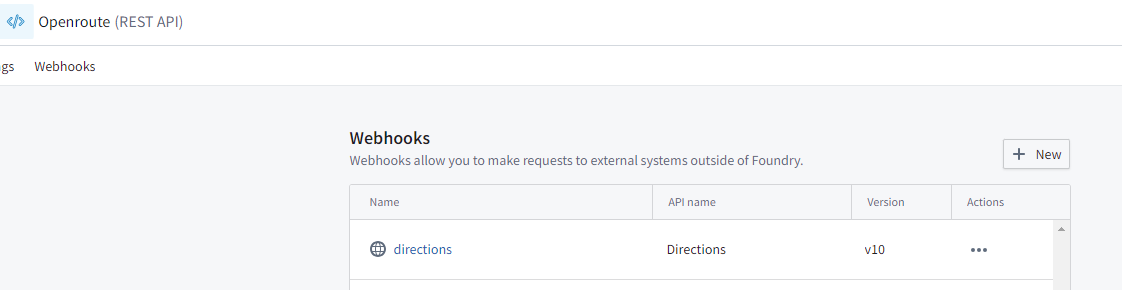
Pass the params
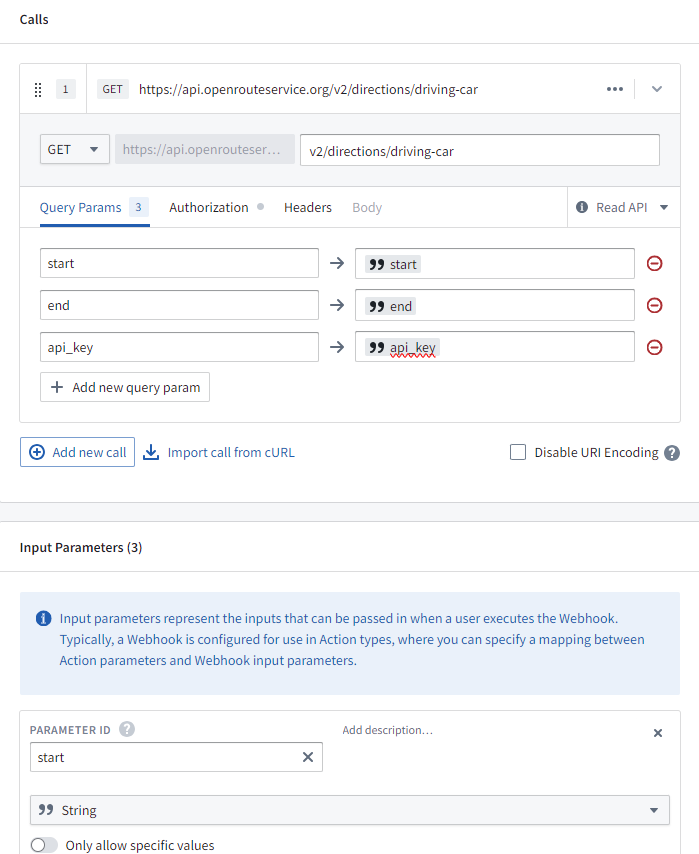
I used API key as a param (don’t do this, this is for a hack-a-thon)
Parse the response
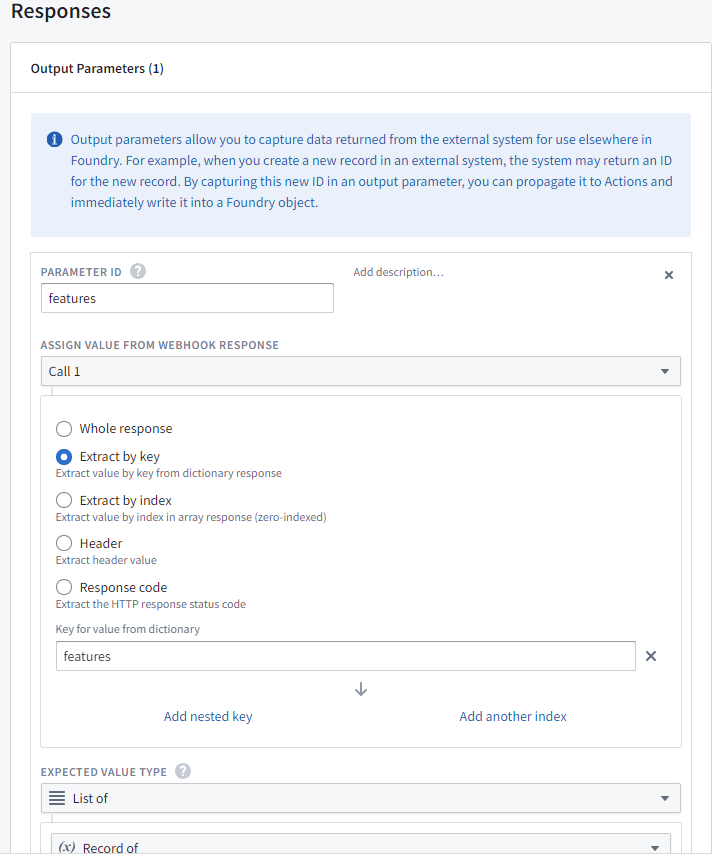
Test the call (Pay attention that the industry standard is lon, lat)
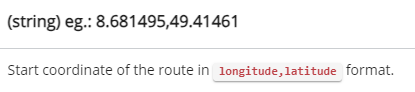
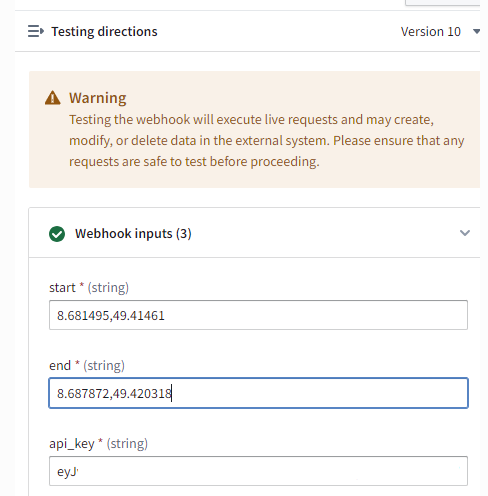
Test
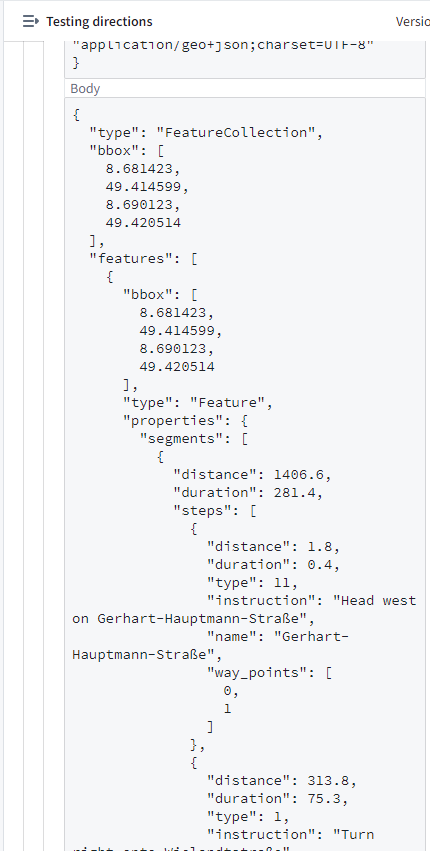
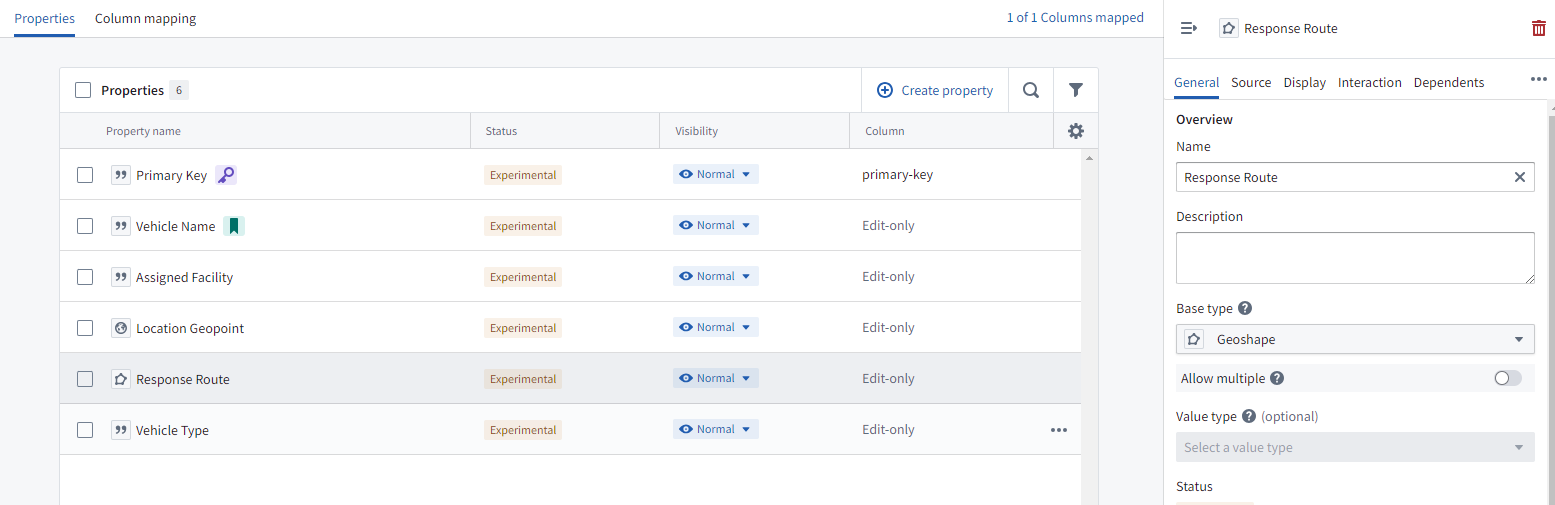
The magic to get these routes to display. Is to have a geoshape property
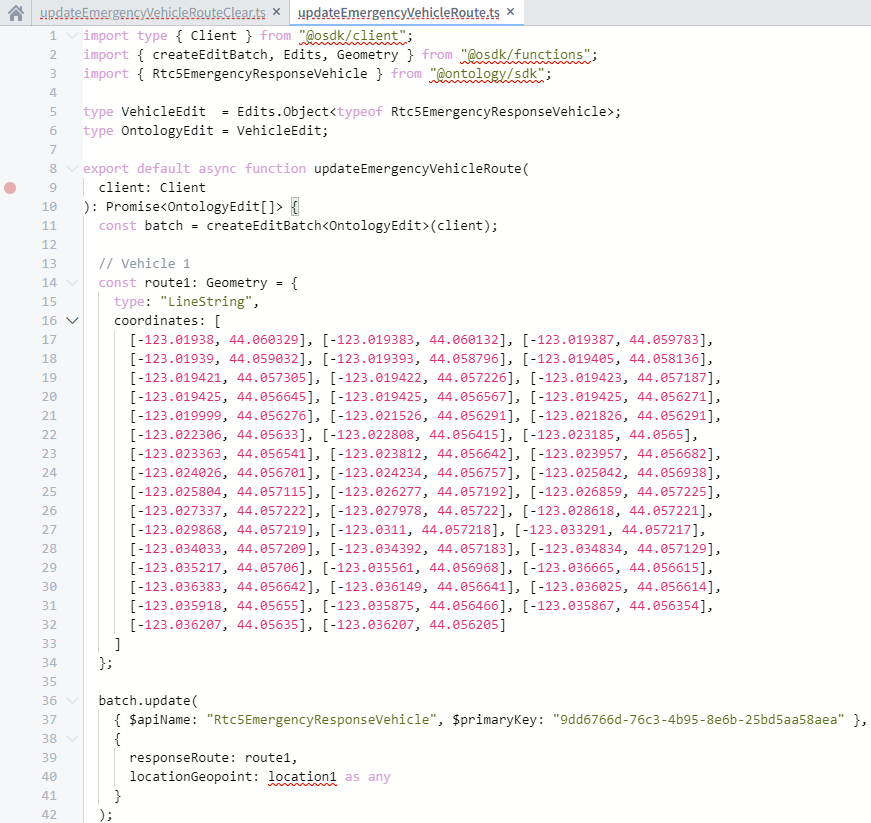
And then write it as a LineString list of coordinates
{"type":"LineString","coordinates":[[-123.01938,44.060329],[-123.019383,44.060132],[-123.019387,44.059783],[-123.01939,44.059032],[-123.019393,44.058796],[-123.019405,44.058136],[-123.019421,44.057305],[-123.019422,44.057226],[-123.019423,44.057187],[-123.019425,44.056645],[-123.019425,44.056567],[-123.019425,44.056271],[-123.019999,44.056276],[-123.021526,44.056291],[-123.021826,44.056291],[-123.022306,44.05633],[-123.022808,44.056415],[-123.023185,44.0565],[-123.023363,44.056541],[-123.023812,44.056642],[-123.023957,44.056682],[-123.024026,44.056701],[-123.024234,44.056757],[-123.025042,44.056938],[-123.025804,44.057115],[-123.026277,44.057192],[-123.026859,44.057225],[-123.027337,44.057222],[-123.027978,44.05722],[-123.028618,44.057221],[-123.029868,44.057219],[-123.0311,44.057218],[-123.033291,44.057217],[-123.034033,44.057209],[-123.034392,44.057183],[-123.034834,44.057129],[-123.035217,44.05706],[-123.035561,44.056968],[-123.036665,44.056615],[-123.036383,44.056642],[-123.036149,44.056641],[-123.036025,44.056614],[-123.035918,44.05655],[-123.035875,44.056466],[-123.035867,44.056354],[-123.036207,44.05635],[-123.036207,44.056205]]}
Can do it with typescript (Hardcoded for an example)
Set your geometry layer to it
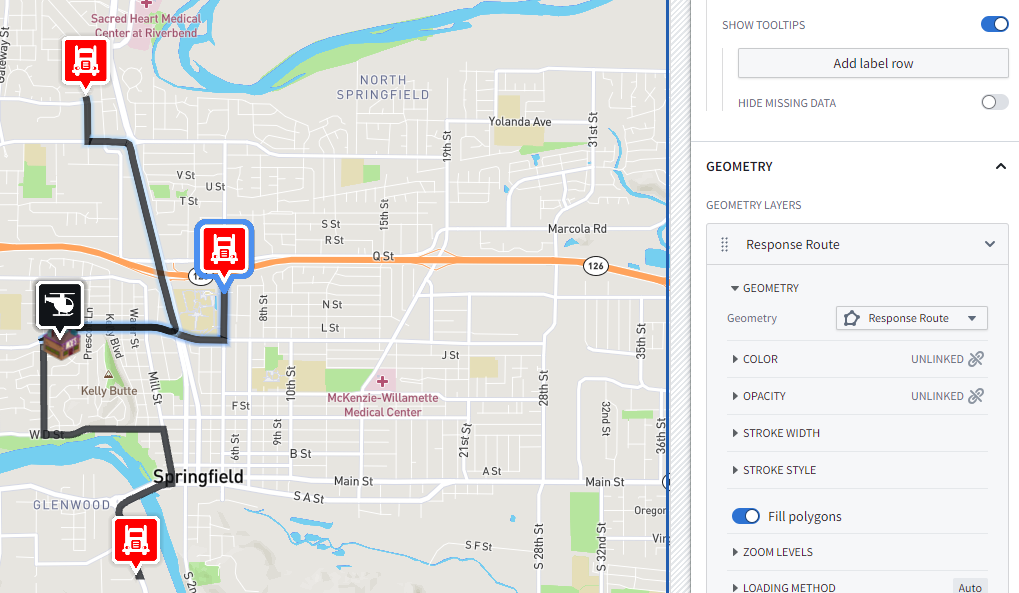
I wanted stuff to follow the routes (I really should have used the OSDK and done real time updates, maybe next time!)
But, the lame version is through compute models + ontology edits!
High level
Loop through objects, if it has a Response Route, move the icon 10 steps, delete the first 9 steps of the route, re-upload the route to the object! Magic
This code has left over from when I was streaming to a dataset
And its not very pretty (its a hack-a-thon)
import os
import json
import time
import requests
import logging
import threading
from datetime import datetime
from requests.exceptions import RequestException

# Logging
logging.basicConfig(
    level=logging.INFO,
    format='%(asctime)s [%(levelname)s] %(message)s',
    datefmt='%Y-%m-%dT%H:%M:%S.%fZ'
)
logger = logging.getLogger(__name__)

# Tokens + Resource Map
with open(os.environ['BUILD2_TOKEN']) as f:
    bearer_token = f.read().strip()

with open(os.environ['RESOURCE_ALIAS_MAP']) as f:
    resource_alias_map = json.load(f)

output_info = resource_alias_map['incoming-lat-lon']
output_rid = output_info['rid']
output_branch = output_info.get('branch', 'master')
logger.info(output_info)

# Foundry routing
FOUNDRY_HOST = "devcon.palantirfoundry.com"

# Failover IPs
FOUNDRY_IPS = [
    "44.205.",
    "52.55.",
    "54.209."
]

# Test coordinates
COORDINATES = [
    (37.441921, -122.161523),
    (37.442041, -122.161728),
]

# Ontology config
ONTOLOGY_RID = "ontology.red"
DELAY_SECONDS = 2
CHECK_INTERVAL = 5

SESSION_TOKEN =

VEHICLES = [
    {"id": "vehicle_id", "name": "Vehicle 1"},

]


# --------------------------------------------------------------------------
#                               FAILOVER PUSH
# --------------------------------------------------------------------------
def push_coordinates(lat, lon):
    current_time = int(datetime.now().timestamp() * 1000)
    payload = {
        "truck_id": "truck_123",
        "timestamp": current_time,
        "latlon": f"{lat},{lon}"
    }

    headers = {
        "Authorization": f"Bearer {bearer_token}",
        "Host": FOUNDRY_HOST
    }

    for ip in FOUNDRY_IPS:
        url = (
            f"https://{ip}/stream-proxy/api/streams/"
            f"{output_rid}/branches/{output_branch}/jsonRecord"
        )

        logger.info(f"Posting to {ip} with payload: {json.dumps(payload)}")

        try:
            response = requests.post(
                url,
                json=payload,
                headers=headers,
                timeout=10,
                verify=False
            )
            response.raise_for_status()
            logger.info(f"✓ Success on {ip}: lat={lat}, lon={lon}")
            return

        except RequestException as e:
            logger.error(f"✗ Failed on {ip}: {e}")

    logger.error("✗ All Foundry IPs failed for this push")


# --------------------------------------------------------------------------
#                           STREAMING LOOP
# --------------------------------------------------------------------------
def streaming_loop():
    logger.info("Starting coordinate push loop")
    while True:
        for lat, lon in COORDINATES:
            push_coordinates(lat, lon)
            time.sleep(10)


# --------------------------------------------------------------------------
#                    VEHICLE ROUTE FOLLOWER
# --------------------------------------------------------------------------
def follow_vehicle_route(vehicle_id, vehicle_name):
    ontology_headers = {
        "Authorization": f"Bearer {SESSION_TOKEN}",
        "Content-Type": "application/json",
        "Host": FOUNDRY_HOST
    }

    get_url_template = (
        f"https://{{ip}}/api/v2/ontologies/{ONTOLOGY_RID}/objects/"
        f"Rtc5EmergencyResponseVehicle/{vehicle_id}"
    )

    edit_url_template = (
        f"https://{{ip}}/api/v2/ontologies/{ONTOLOGY_RID}/actions/"
        f"edit-rtc5emergency-response-vehicle/apply"
    )

    step_count = 0
    route_count = 0

    while True:
        vehicle = None

        # GET with failover
        for ip in FOUNDRY_IPS:
            get_url = get_url_template.format(ip=ip)
            try:
                r = requests.get(
                    get_url,
                    headers=ontology_headers,
                    verify=False,
                    timeout=10
                )
                if r.status_code == 200:
                    vehicle = r.json()
                    break
            except Exception:
                continue

        if vehicle is None:
            print(f"[{vehicle_name}] ✗ GET failed on all IPs")
            time.sleep(CHECK_INTERVAL)
            continue

        response_route = vehicle.get("responseRoute")

        if not response_route or response_route.get("type") != "LineString":
            print(f"[{vehicle_name}] ⏳ Waiting for route...", end="\r")
            time.sleep(CHECK_INTERVAL)
            continue

        coordinates = response_route.get("coordinates", [])
        if not coordinates:
            print(f"[{vehicle_name}] ⏳ Waiting for route...", end="\r")
            time.sleep(CHECK_INTERVAL)
            continue

        if step_count == 0:
            route_count += 1
            print(
                f"\n[{vehicle_name}] 🚀 Route #{route_count} "
                f"({len(coordinates)} points)"
            )

        step_count += 1

        if len(coordinates) <= 10:
            target_index = len(coordinates) - 1
            target_point = coordinates[target_index]
            is_final = True
        else:
            target_index = 9
            target_point = coordinates[target_index]
            is_final = False

        lng = target_point[0]
        lat = target_point[1]

        new_coordinates = coordinates[target_index + 1:]

        if is_final and not new_coordinates:
            if target_index >= 1:
                new_route = {
                    "type": "LineString",
                    "coordinates": [
                        coordinates[target_index - 1],
                        target_point
                    ]
                }
            else:
                new_route = {
                    "type": "LineString",
                    "coordinates": [target_point, target_point]
                }
        else:
            new_route = {
                "type": "LineString",
                "coordinates": new_coordinates
            }

        edit_data = {
            "parameters": {
                "Rtc5EmergencyResponseVehicle": vehicle_id,
                "vehicleName": vehicle.get("vehicleName"),
                "vehicleType": vehicle.get("vehicleType"),
                "assignedFacility": vehicle.get("assignedFacility"),
                "locationGeopoint": f"{lat},{lng}",
                "responseRoute": json.dumps(new_route),
            }
        }

        updated = False
        for ip in FOUNDRY_IPS:
            try:
                edit_url = edit_url_template.format(ip=ip)
                r = requests.post(
                    edit_url,
                    headers=ontology_headers,
                    json=edit_data,
                    verify=False,
                    timeout=10
                )
                if r.status_code == 200:
                    updated = True
                    break
            except Exception:
                continue

        if updated:
            if is_final:
                print(f"[{vehicle_name}] ✅ Route #{route_count} complete!")
                step_count = 0
            else:
                print(
                    f"[{vehicle_name}] ✓ Step {step_count}: "
                    f"{len(new_coordinates)} points left"
                )
        else:
            print(f"[{vehicle_name}] ✗ Update failed on all IPs")

        time.sleep(DELAY_SECONDS)


# --------------------------------------------------------------------------
#                             MAIN
# --------------------------------------------------------------------------
if __name__ == "__main__":
    logger.info("=" * 80)
    logger.info("Starting STREAMING + VEHICLE TRACKING with FAILOVER")
    logger.info("=" * 80)

    threading.Thread(target=streaming_loop, daemon=True).start()
    logger.info("✓ Streaming thread started")

    for v in VEHICLES:
        threading.Thread(
            target=follow_vehicle_route,
            args=(v["id"], v["name"]),
            daemon=True
        ).start()
        logger.info(f"✓ Started tracking {v['name']}")

    logger.info("All threads running. Ctrl+C to stop.")

    try:
        while True:
            time.sleep(1)
    except KeyboardInterrupt:
        logger.info("Stopping...")
 Michael Ellerbeck